




Ava (Addy’s very adaptable) CMS (Content Management System) is a fast, flexible, file-based PHP CMS for bespoke websites. Create a file, write in Markdown (with optional HTML), and you have a page. Edit it, refresh, and it’s live with no required build step in auto indexing mode.
Content is plain text files you can read, move, and version. Use your favourite editor and tools and Ava CMS fits your workflow.
When you need more power, Ava CMS adds it without hiding the structure: PHP themes, custom content types, taxonomies, search, caching, plugins, and a friendly CLI. The idea stays simple: files in, website out.
Philosophy
Ava CMS is for people who like owning and understanding how their site works. It keeps the “just files” simplicity, while giving you dynamic tools when you need them.
📝 Markdown & HTML Write in Markdown, drop to HTML when you need to, and keep metadata clean with YAML frontmatter. Your content stays portable, readable, and truly yours.
⚡ Instant Feedback Edit a file and refresh — no build step, no deploy queue. Auto-indexing mode keeps routing, lists, and search up to date as you work.
🎨 Design Freedom No templating language to learn. Themes are plain PHP templates with your own HTML, CSS, and JavaScript — Ava stays out of the way.
🧩 Model Anything Define your own content types and taxonomies for projects, posts, events, recipes — whatever fits. Structure is first-class, not a hack.
🚀 Blazing Fast Dual cache layers and optimised code paths keep pages quick by default — from tiny personal sites to busy production builds.
🗄️ No Database Required Run happily with just files. If your site grows massive, switch to SQLite with a single config line — without changing how you write content.
🧰 Built for Builders Extend with plugins, hooks, and shortcodes — plus a robust CLI for linting, indexing, and cache management. Use the tools you already know.
🤖 LLM Friendly The clean file structure, integrated docs, and straightforward CLI make it easy to pair with AI assistants when building themes and extensions.
Core Features
| Feature | What it does for you |
|---|---|
| Content Types | Define exactly what you're publishing (Pages, Posts, Projects, etc.). |
| Taxonomies | Organise content your way with custom categories, tags, or collections. |
| Smart Routing | URLs are generated automatically based on your content structure. |
| Themes | Write standard HTML and CSS, use PHP and Ava CMS helpers only where you need to. |
| Shortcodes | Embed dynamic content and reusable snippets in your Markdown. |
| Plugins | Add functionality like sitemaps and feeds without bloat. |
| Speed | Built-in page caching makes your site load instantly, even on cheap hosting. |
| Search | Full-text search across your content with configurable weights and synonyms. |
| CLI Tool | Manage your site from the command line: clear caches, run tests, and more. |
Optional Markdown Extensions
Ava bundles optional Markdown extensions for footnotes, description lists, highlighting, smart punctuation, external links, attributes, and automatic tables of contents. No additional Composer dependencies are required. Extensions default to never to preserve Ava's default Markdown rendering and avoid unnecessary parsing overhead, with modes available for site-wide or per-document control.
See the Markdown extension reference →
Files in, website out
Ava CMS projects are intentionally simple: your content is text files, your theme is a collection of HTML/PHP templates, and your configuration is plain PHP arrays. No magic, no hidden layers.
Here’s what a typical Ava CMS site looks like:
mysite/
├── app/                 # Your code
│   ├── config/          # Configuration files
│   │   ├── ava.php      # Main config (site, paths, caching)
│   │   ├── content_types.php
│   │   └── taxonomies.php
│   ├── plugins/         # Enabled plugins
│   ├── snippets/        # Reusable PHP content blocks
│   └── themes/          # Your HTML/PHP templates
│       └── default/
│           ├── templates/
│           └── assets/
├── content/
│   ├── pages/           # Page content (hierarchical URLs)
│   ├── posts/           # Blog posts (/blog/{slug})
│   └── _taxonomies/     # Term registries
├── public/              # Web root
│   ├── media/           # Downloads referenced via /media/ alias
│   └── index.php        # Entry point
├── storage/cache/       # Content index and page cache (gitignored)
└── ava                  # CLI tool
How It Works
- Write — Create Markdown files in your
content/folder using your own editor. - Index — Ava CMS scans your files and builds a fast index.
- Render — Your theme turns that content into beautiful HTML.
Routing, sorting, pagination, and search are handled for you so you can focus on content and design.
Is Ava CMS for You?
Ava CMS is a great fit if:
- You want a site you can fully own, understand, and move between hosts.
- You like writing in a real editor instead of a web form.
- You know some HTML and CSS (or want to learn), and you’re happy to customise a theme.
- You want a fast site without build pipelines, deploy queues, or complicated tooling.
- You’d rather keep things simple: files first, database optional.
It won’t be a good fit if you need a drag-and-drop page builder or a huge marketplace of third‑party themes and plugins.
Performance
Ava CMS is designed to be fast by default, whether you have 100 posts or 100,000.
- Instant Publishing: No build step. Edit a file, refresh your browser, see it live.
- Smart Caching: A tiered caching system keeps page generation extremely fast.
- Scalable Backends: Start with the default Array backend for raw speed, or switch to SQLite for constant memory usage at scale.
- Static Speed: Enable full page caching to serve static HTML files, bypassing the application entirely for most visitors.
See full benchmarks and scaling guide →
Command Line Interface
Ava CMS includes a friendly CLI for managing your site. Run commands from your project root to check status, rebuild indexes, create content, and more.
./ava status
   ▄▄▄  ▄▄ ▄▄  ▄▄▄     ▄▄▄▄ ▄▄   ▄▄  ▄▄▄▄
  ██▀██ ██▄██ ██▀██   ██▀▀▀ ██▀▄▀██ ███▄▄
  ██▀██  ▀█▀  ██▀██   ▀████ ██   ██ ▄▄██▀

  ─── Site ──────────────────────────────────────────────

  Name:       My Site
  URL:        https://example.com

  ─── Content ───────────────────────────────────────────

  ◆ Page: 5 published
  ◆ Post: 38 published (4 drafts)

  ─── Page Cache ────────────────────────────────────────

  Status:     ● Enabled
  Cached:     42 pages
Requirements

Ava CMS requires PHP 8.3 or later and SSH access for CLI commands. Most good hosts include this.
Required Extensions:
mbstring— UTF-8 text handlingjson— Config and API responsesctype— String validation
These are bundled with most PHP installations.
Optional Extensions:
pdo_sqlite— SQLite backend for large sites (10k+ items, constant memory)igbinary— Faster content indexing and smaller cache filesopcache— Opcode caching for production
If igbinary isn't available, Ava CMS falls back to PHP's built-in serialize. Both work fine, igbinary is just faster.
Quick Start
Getting started with Ava CMS is simple and the default set-up can be put live in just a minute. Here are a few options:
main branch may contain incomplete or untested work.
Download and Upload
The simplest approach—no special tools required:
- Download the latest release from GitHub Releases
- Extract the ZIP file
- Upload to your web host (via SFTP, your host's file manager, or however you prefer)
- Run
composer installto install dependencies - Configure your site by editing
app/config/ava.php - Run
./ava rebuildto build the content index - Visit your site!
Download Latest Release (Command Line)
If you have SSH access and prefer the terminal, downloading the latest release is the cleanest approach (no Git required).
Option A: GitHub CLI (gh)
mkdir -p /tmp/ava-release && cd /tmp/ava-release
gh release download -R avacms/ava --pattern '*.zip' --clobber
unzip -q ./*.zip -d /path/to/your/site
cd /path/to/your/site
composer install
Then configure your site by editing app/config/ava.php and run ./ava rebuild to build the content index.
Option B: curl (uses PHP to pick the right ZIP asset)
REPO='avacms/ava'
URL="$(
  curl -fsSL "https://api.github.com/repos/$REPO/releases/latest" |
  php -r '$r=json_decode(stream_get_contents(STDIN), true);
    foreach (($r["assets"] ?? []) as $a) {
      if (str_ends_with($a["name"], ".zip")) { echo $a["browser_download_url"]; exit; }
    }
    fwrite(STDERR, "No .zip asset found on latest release\n");
    exit(1);'
)"

mkdir -p /tmp/ava-release && cd /tmp/ava-release
curl -fL "$URL" -o ava.zip
unzip -q ava.zip -d /path/to/your/site
cd /path/to/your/site
composer install
Then configure your site by editing app/config/ava.php, run ./ava rebuild to build the content index, and visit your site.
Local Development (Optional)
If you want to preview your site on your own computer before going live:
composer install                    # Install dependencies (first time only)
php ava rebuild                     # Build the content index
php -S localhost:8000 -t public     # Start the dev server
Then visit http://localhost:8000 in your browser.
php ava instead of ./ava for all CLI commands. See the Hosting Guide for detailed Windows setup instructions.
./ava commands, run chmod +x ava to make the script executable. This is common after extracting from a ZIP or uploading via SFTP. See the CLI documentation for more details.
Ready for Production?
Ready for Production?
See the Hosting Guide for shared hosting, VPS options, and deployment tips.
Default Site
By default, Ava CMS comes with a simple example site. You can replace the content in the content/ folder and your theme in the app/themes/default/ folder to start building your site.
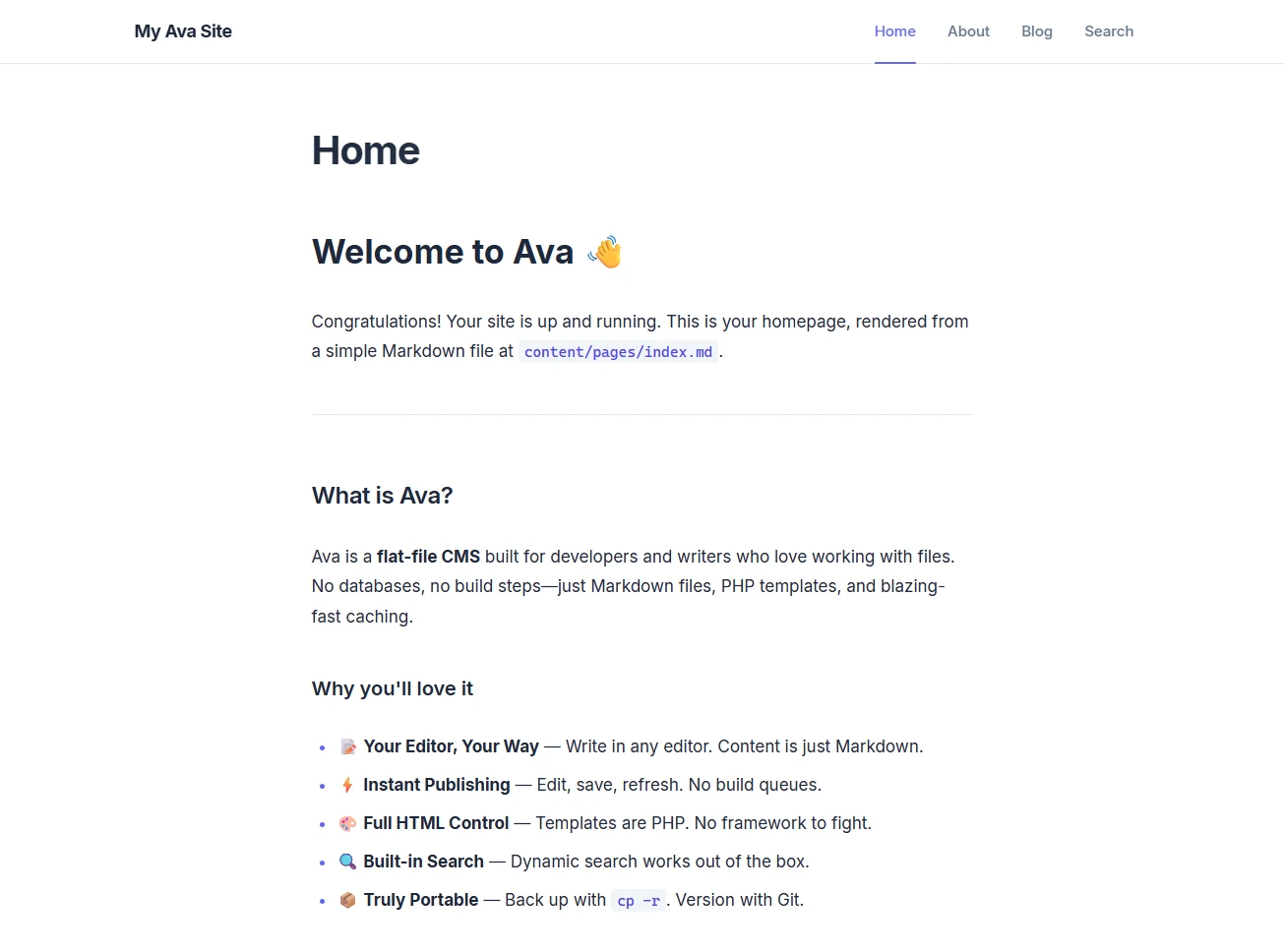
The default theme provides a clean, minimal starting point for your site. Customise it with your own styles, scripts and templates to match your vibe or build something entirely new.
Next Steps
- Configuration — Site settings, content types, and taxonomies
- Content — Writing pages and posts
- Hosting — Getting your site live
- Theming — Creating templates
- CLI — Command-line tools
- Showcase — Community sites, themes, and plugins
Community
See what others are building with Ava CMS:
- Community Plugins — Extend Ava CMS with plugins shared by the community
- Community Themes — Ready-to-use themes for your site
- Sites Built with Ava CMS — Get inspired by what others have created
Contributing
Ava CMS is still fairly early and moving quickly, so I'm not looking for undiscussed pull requests or additional contributors just yet.
That said, I'd genuinely love your feedback:
- If you run into a bug, get stuck, or have a "this could be nicer" moment, please open an issue.
- Feature requests, ideas, and suggestions are very welcome.
If you have questions or want to share ideas, join the GitHub Discussions.
License
Ava CMS is free software: you can redistribute it and/or modify it under the terms of the GNU General Public License as published by the Free Software Foundation, either version 3 of the License, or (at your option) any later version.
This program is distributed in the hope that it will be useful, but WITHOUT ANY WARRANTY; without even the implied warranty of MERCHANTABILITY or FITNESS FOR A PARTICULAR PURPOSE. See the GNU General Public License for more details.
You should receive a copy of the GNU General Public License along with the program. If not, see https://www.gnu.org/licenses/.